
AI calorie tracker with a petReach your goal weight. Together.
Yumizo is an AI calorie tracker and food tracker for iPhone, iPad and Android. Snap, say, scan or type what you eat, and a small friend eats with you all the way to your goal.


Free to start · No sign-up needed

From day one to goal day.
Three steps, and your pet is with you for every one of them.
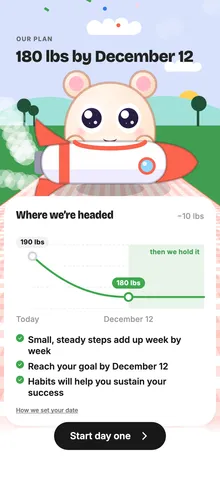
Set your goal
Answer a few questions about you and your goal, and get a plan with a date to aim for.

Log every day
Snap, say, scan or type your meals. Your pet keeps the streak going with you.

Reach it, together
Weigh in as you go and watch the line come down to your goal.


Example screens. Your plan and pace come from your own answers.


Snap, say, scan or type.
However you remember what you ate, Yumizo turns it into calories, and you can fix the portion before you save.
Snap
Photograph your plate. The AI spots each food and estimates the portion.
Say
Tell it “two eggs and toast with butter” and it logs the lot.
Scan
Point at a barcode or a nutrition label for anything in a packet.
Type
Search the food database, or type a meal the way you’d say it.

A small friend who eats with you.
Name your pet and share every meal with them. They react to what you log, celebrate your streaks and keep you company all the way to your goal.


Dress up with Berries
Earn Berries as you go and spend them on hats and new scenery for your picnic.

On your home screen
Pet, Calories, Today and Water widgets keep your friend one glance away. On iPhone, Snap opens the camera from the lock screen.

More than a calorie counter.
The tools that help a goal stick, in the same app as your pet. Some are part of Yumizo Plus.
Fasting tracker
Pick a fasting plan and watch each fast count down.
Macro balance
Carbs, fats and protein for every meal and for the whole day.
Meal plan and grocery list
A week of meals built around your goal, with the shopping list to match.
Statistics
Your week, month and year at a glance, so you can see what is working.
Weekly recap
Every week your pet sums up your best meals, your wins and who you were that week.
Water and weight
Log glasses of water and weigh-ins right beside your meals.
Questions, answered.
Can’t find yours? Write to support@yumizo.app.
- What is Yumizo?
- Yumizo is an AI calorie tracker and food tracker for iPhone, iPad and Android. Snap, say, scan or type what you eat, and a small friend eats with you all the way to your goal.
- Is Yumizo free?
- Yumizo is free to download and start using, with no sign-up. The free plan includes 2 AI logs a day (a meal photo, a nutrition label or a meal you describe), and barcode scanning and food search are unlimited for everyday use. Some features are part of Yumizo Plus, an optional subscription. The app shows what’s included and the price in your currency.
- Do I need to create an account?
- No. Open the app, answer a few questions about your goal and start logging. When you want to keep your progress safe, save it with Apple, Google or email.
- How does counting calories from a photo work?
- Take a photo of your plate. Yumizo’s AI recognizes the foods, estimates each portion and works out the calories. They are estimates, so you can change the portion or the calories before you save.
- Can I log food without photographing my meal?
- Yes. Say what you ate, scan a barcode or a nutrition label, or search the food database and type it in.
- What does the pet do?
- You name it and share your meals with it. It reacts to what you log, celebrates your streaks, wears the hats you buy with Berries in the scenery you pick, and sums up your week in a weekly recap. Home-screen widgets keep it one glance away.
- Is my health data private?
- Your health data and the AI features are only used with your consent. No ads, no selling your data and no tracking across apps. You can download your data or delete your account from inside the app.
- Which devices does Yumizo work on, and who is it for?
- iPhone and iPad with iOS 15 or later, and Android phones and tablets with Android 7.0 or later. Home-screen widgets on iPhone need iOS 17 or later. Yumizo is for adults 18 and over.
- Was Yumizo called something else before?
- Yes. Yumizo was previously called Caloa AI. It’s the same App Store listing with a new name and a redesigned app, built around a pet who eats with you. Subscribed under the old name? Open Yumizo and tap Me › Subscription › Restore purchases.

Your pet is waiting at the picnic.
Free to start on iPhone, iPad and Android.